Showing posts with label Symbian^3 Hacking. Show all posts

Sunday, October 9, 2011

[Did You Know?] You can now Hack your symbian without PC & certificates !

Finally had some free time to post about this, i guess it'll make symbian owners who can't generate certificates happy !

1. install NortonSymbianHack.sisx
2. Launch
3. Go Options- Anti-Virus - Quarantine list
4. Go Options - Restore, accept prompt ("yes")
5. Exit application, delete it from App manager (Symantec Symbian Hack). Also delete c:\shared\ folder.
6. Install RomPatcherPlus_3.1.sisx
7. Launch and apply patches:
- Open4all for full access to file system
- Installserver for installing any unsigned applications ( if you see a red cross on installserver in RomPatcher then get installserver.exe* and move it to C:/sys/bin via x-plore file manager for example)
- Set patches to auto if needed (Options - Add to auto)

* Select the file corresponding to your model (see the *.txt file on the attachment)


All credits to CODeRUS !

Thursday, August 18, 2011

[Modding] Charging Led with Missed Events !

This mod by Ancelad disables charging led, but forces it to blink when you have missed events !

- When you've missed events - charging led blinks every 250 ms (he is turned on during 200 ms) - you can change these values.

- When you haven't missed events - charging led blinks every 5500 ms (he is turned on during 750 ms) - you can also change these values. And it'll do it all the time even with charger

Download and install Led Events and reboot your device ;)

To change values - go to c:\private\10282bc4\rules, open file dfs7x92_light_notification_control.rul and edit it, find string

Code:


And edit onDuration and offDuration values as you want (in ms, 1 sec=1000 ms). Save this file and reboot to take effect.

Only for hacked phones. Works with Nokia N8 and E6 (didn't test on C7 yet)


[Modding] Screen Saver in Landscape like On Nokia E7 !

To have the screen saver Symbian^3 in landscape mode in the same way as the Nokia E7 all you have to do is to :

- Download the installation file below (Unzip the. Zip)
- Sign the file (or without signing if your phone is hacked)
- Install the .sis
- Restart the phone

The screen saver does not get in landscape mode only if you lock the phone when it is in landscape mode of course (for the moment).  

Sunday, August 14, 2011

[Modding] Custom Communication Log Duration !

For you from CODeRUS ! This time you can change the duration for communication log beyond the limit of 30 days, you can manually enter any numeric value in days !


For installing unpack archive to C drive and reboot phone as usual !

[Modding] FullScreen Swipe Menu v2 !

Yesterday i posted about Full Screen Swipe Menu for S^3 a quick update is now live to :

- Fix anti-aliasing style for fonts.
- Bring scalable font! now font size proportional to the value height in mul_title
- Create c:\system\grid\swapswipe file to change left-right swipe actions

As usual, for installing unpack archive to C drive, apply c2z4bin patch, and reboot menu (or kill menu process and launch menu again)

[Modding] Full Screen Swipe Menu for S^3 !

Hi there, a new day, a new mod !

This time, CODeRUS cames with mod that makes fullscreen menu with swipe management à la N9 !


How to use?

Swipe right to Exit/Return or swipe left to open Options menu. grids are 5x7, 5x8 and 4x8. 5x7 is default grid

Use with c2z4bin patch (use it with ROMPatcher)

Then install Full Screen Swipe Menu

Reboot and enjoy !

All credits to CODeRUS and Ancelad

Sunday, August 7, 2011

[Hacking] SysAp 2.4 + Splashscreen for S^3 released !

Hello folks,

Just to let you know that there's a new version of SysAp that has been published to bring :

07.08.2011 version 2.4
- changing application on Camera key
- fixed reboot speed

19.07.2011 version 2.3
- changing to-be deleted items when booting with new SIM-card

Follow the same instructions if you install it for tge first time, if you have last mod (domainsrv pack) already installed should move c:\sys\bin\domainsrv.exe first and reboot phone.

Then unpack archive to C, and follow the rest of instructions as on this post

Sunday, June 26, 2011

[Modding] Equalizer Editor Enabler !

Hello folks ! To continue the series of symbian^3 hacking and mods,

Do you remember my first tip to Create and Edit Custom Equalizer On your N8?   Now there's another mod by CODeRUS enabling the equalizer creation and editing from the native s^3 music player ;)

Requirements :

- Hacked Symbian^3 device
- Modded R&D FileBrowser that comes with Just Hackit!

How To?

1- Download equalizer.zip
2- Unpack and copy it to C drive using modded R&D FileBrowser that comes with Just Hackit!
(be careful, and copy/overwrite each file(s) in dedicated folder on C)
3- Reboot and enjoy editing and creating equalizer as you wish !


All credits goes to CODeRUS !

Sunday, June 12, 2011

[Hacking] RomPatcher+ v3.0 : S^3 devices are now supported !


RomPatcher+ is an improved and fixed version of the RomPatcher software developed by ZoRn.
Using RomPatcher+ it is possible to reach a new level of customization for you Symbian phone.

This is the list of the main differences in comparison with RomPatcher by ZoRn:

- New: compatible with all the 3rh, 5th, S^3 devices
- New: support for compiled patches
- New: can dump the whole rom content to file \romdumpplus.dmp
- New: can dump the SuperPage content to file \superpage.dmp
- New: full support for DomainSrv.exe autostart.
- New: introduced new commands ord_rel, ord_snr which allow to patch DLL using ordinal.
- New: can be integrated in cooked ROM firmware
- New: it is now possible to apply/remove patches with just 1 click.
- New: added vertical scrollbar.
- New: introduced support for the new command '+SuperPage' which allow to patch the RAM area where is stored the SuperPage.
- New: introduced support for a new commands, info: return: error: check the demo1-4.rmp patches included.
- New: introduced #ifdef, #ifndef, #else, #endif, #define statements. This will allow to retrieve system values at runtime to create more flexible and powerful patches. Check the ReadMe_Macros.txt for all the details.
- New: you can search / filter the patches in the list. Just start typing the patch name to apply the filter.
- New: wildcard ?? support for patches.
- Fixed: Kern-Exec0 error when closing RomPatcher after a patch was applied.
- Fixed: doesn't unexpectedly crash when using large and complex patches.
- Fixed: RP+ can correcly patch contiguous shadow ram pages without any crash.
- Improved: the shadow ram memory is now fully released when a patch is removed.
- Improved: the 'Patch Info...' option shows all the information lines contained in the patch.


NOTE:
I don't know exactly which patches are still working on S^3.
For sure the Open4All.rmp patch still works, for other patches you'll have to try by yourself! ;)


[quote]
Warning: If you like this software then support RP+ with a donation.
http://www.symbian-toys.com/rompatcherplus.aspx
[/quote]

Thursday, June 9, 2011

[Modding] S^3 Multiple Mods v7.00 : Over 58 Mods For your S^3 Device !

Hello folks ! It's time for some modding to make the most out from your symbian^3 smartphone !

With S^3 Multiple Mods v7.00 you can have the benefit from 58 mods without even hacking your phone !


All you have to do is to :

1. Download S^3 Multiple Mods v7.00.
2. Sign the .sis with your own cert.
3. Run the signed .sis.
4. Select the mods that you like to install.
5. REBOOT the phone.


So what can we do with it?


For Mods #01,#02 ONLY select 1 option, if multiple options selected the top most option will be use.

01. KS Type A Improvement Recommended!
- Improve on Kinetic Scrolling, original mods from previous version now your list will be easier/faster/longer on kinetic scroll (you wil SURE feel the different).

02. KS Type B Improvement
- Improve on Kinetic Scrolling, NEW KS mods from PimpJuice mods which make the kinetic scrolling very fast and won't slow down (credit to PimpJuice's mods).

03. UI Improvement - Experiment Mod Recommended!
- Improve UI responsiveness, mods been fine tuned, changed the default FPS from 67FPS to 72FPS and max processing power from 75% to 90% (credit to faenil's mods).

04. Camera Sound Mute Recommended!
- Enable the camera sound to be mute when warning tone been turn off.

For Mods #05,#06 ONLY select 1 option, if multiple options selected the top most option will be use.

05. N8 Continuous AutoFocus Recommended!
- You will have an EXTRA option under Video Setting that enable the Continuous AF during video.

06. E7/C7 Video Mods
- Mods for E7/C7/C6-01 video, enhance zoom steps and increase night mode FPS.

For Mods #07,#08,#09,#10,#11,#12,#13,#14,#15,#16 ONLY select 1 option, if multiple options selected the top most option will be use.

07. N8 Pic/Vid (100/30FPS)
- Photo quality change the compression ratio from original 85/75/60 to 100/85/75, video will change from 25FPS to 30FPS and the capture audio quality will change from 128kbps to 256kbps.

08. N8 Pic/Vid (097/30FPS)
- Photo quality change the compression ratio from original 85/75/60 to 97/85/75, video will change from 25FPS to 30FPS and the capture audio quality will change from 128kbps to 256kbps.

09. N8 Pic/Vid (095/30FPS) Recommended!
- Photo quality change the compression ratio from original 85/75/60 to 95/85/75, video will change from 25FPS to 30FPS and the capture audio quality will change from 128kbps to 256kbps.

10. N8 Pic/Vid (097/25FPS)
- Photo quality change the compression ratio from original 85/75/60 to 97/85/75, video remain 25FPS with capture audio quality will change from 128kbps to 256kbps.

11. N8 Pic/Vid (085/30FPS)
- Photo quality remain as original 85/75/60, video will change from 25FPS to 30FPS and the capture audio quality will change from 128kbps to 256kbps.

12. E7/C7 Pic/Vid (100/30FPS)
- Photo quality change the compression ratio from original 85/75/60 to 100/85/75, video will change from 25FPS to 30FPS and the capture audio quality will change from 128kbps to 256kbps.

13. E7/C7 Pic/Vid (097/30FPS)
- Photo quality change the compression ratio from original 85/75/60 to 97/85/75, video will change from 25FPS to 30FPS and the capture audio quality will change from 128kbps to 256kbps.

14. E7/C7 Pic/Vid (095/30FPS)
- Photo quality change the compression ratio from original 85/75/60 to 95/85/75, video will change from 25FPS to 30FPS and the capture audio quality will change from 128kbps to 256kbps.

15. E7/C7 Pic/Vid (097/25FPS)
- Photo quality change the compression ratio from original 85/75/60 to 97/85/75, video remain 25FPS with capture audio quality will change from 128kbps to 256kbps.

16. E7/C7 Pic/Vid (085/30FPS)
- Photo quality remain as original 85/75/60, video will change from 25FPS to 30FPS and the capture audio quality will change from 128kbps to 256kbps.

17. Photo Gallery Folders Recommended!
- Photo Gallery Folders excluded lots of folders path (please take note some of the folders path are hardcoded to be scan and can't be excluded from listing).

18. Music Gallery Folders Recommended!
- Music Gallery Folders excluded lots of folders path (please take note some of the folders path are hardcoded to be scan and can't be excluded from listing).

For Mods #19,#20, ONLY select 1 option, if multiple options selected the top most option will be use.

19. Browser's Cache (D:\)
- Change the default browser cache folder from C: to D: and set the amount to 32MB, actual effects need those HEAVY internet users feedback.

20. Browser's Cache (E:\) Recommended!
- Change the default browser cache folder from C: to E: and set the amount to 32MB, actual effects need those HEAVY internet users feedback.

For Mods #21,#22,#23, ONLY select 1 option, if multiple options selected the top most option will be use.

21. Start/Shut (C:\Animations)
- Redirect the phone to look for the Startup.gif and Startup.mp3 during startup in C:\Animations folder and look for the Shutdown.gif and Shutdown.mp3 during shutdown in C:\Animations folder. If none are found then the phone won't play any startup/shutdown animations at all.

22. Start/Shut (E:\Animations) Recommended!
- Redirect the phone to look for the Startup.gif and Startup.mp3 during startup in E:\Animations folder and look for the Shutdown.gif and Shutdown.mp3 during shutdown in E:\Animations folder. If none are found then the phone won't play any startup/shutdown animations at all.

23. Start/Shut (F:\Animations)
- Redirect the phone to look for the Startup.gif and Startup.mp3 during startup in F:\Animations folder and look for the Shutdown.gif and Shutdown.mp3 during shutdown in F:\Animations folder. If none are found then the phone won't play any startup/shutdown animations at all.

24. Start/Shut Vol 90% Recommended!
- Increase the Startup/Shutdown default volume from 40% to 90%.

25. Voice Recorder (12H/256kbps/Stereo) Recommended!
- Set the default Voice Recorder to high quality recording (from 64kbps to 256kbps) and increase the max duration of the recording clip from 60mins to 720mins.

26. Music Player Volumn/Heap Mods (100%/32MB) Recommended!
- Experiment mods, no significant effect after the mods.

27. Context Data Object Maximum Size Mod Recommended!
- Experiment mods, no significant effect after the mods.

28. Light Sensor Disable
- Totally disable the Light Sensor, LCD will have 100% brightness all the time (will dim ONLY in power safe mode)

29. Haptics Improvement Recommended!
- Lower the vibration and fine tune level 1/2/3 haptics feedback (not must different as i can tell)

30. Vibration Alert Improvement Recommended!
- Same goes with haptics mods, can't really feel big different

31. Camera Full Shutdown (RAM) Recommended!
- Camera apps will fully shutdown once you close the apps (won't remain in the memory), but the N8 have better camera apps as the total shutdown and without only make ~1Mb ram saving (not like what we see in 5800xm as it's camera apps are memory *****)

32. Message Full Shutdown (RAM)
- Message apps will fully shutdown once you close the apps (won't remain in the memory), no significant RAM saving and not sure it will causing others conflict or not (use at your own risk!).

33. Logs Full Shutdown (RAM)
- Logs apps will fully shutdown once you close the apps (won't remain in the memory), no significant RAM saving and not sure it will causing others conflict or not (use at your own risk!).

34. Calendar Full Shutdown (RAM)
- Calendar apps will fully shutdown once you close the apps (won't remain in the memory), no significant RAM saving and not sure it will causing others conflict or not (use at your own risk!).

35. Clock Full Shutdown (RAM)
- Clock apps will fully shutdown once you close the apps (won't remain in the memory), no significant RAM saving and not sure it will causing others conflict or not (use at your own risk!).

36. Contacts Full Shutdown (RAM)
- Contacts apps will fully shutdown once you close the apps (won't remain in the memory), no significant RAM saving and not sure it will causing others conflict or not (use at your own risk!).

37. Fast Screen Rotation Recommended!
- Can feel "a bit" faster but not lighting fast as the delay seem not from the sensor but rather from the UI.

For Mods #38,#39,#40,#41 ONLY select 1 option, if more then 1 option selected NOTHING will be install.

38. N8 FM Transmitter RDS Recommended!
- The FM Transmitter now send RDS "Nokia N8" and not just "Nokia".

39. E7 FM Transmitter RDS
- The FM Transmitter now send RDS "Nokia E7" and not just "Nokia".

40. C7 FM Transmitter RDS
- The FM Transmitter now send RDS "Nokia C7" and not just "Nokia".

41. C6-01 FM Transmitter RDS
- The FM Transmitter now send RDS "Nokia C6-01" and not just "Nokia".

42. Video Call FPS Improvement Recommended!
- Slightly change the video call setting fps from original min/norm/max of 5/10/15 to 10/15/20. Not tested as not really use video call.

43. Database Max Record Count Recommended!
- Experimental mod, Increase database from 20 to 50.

44. HWRM Process Priority Recommended!
- Experimental mod, Hardware sensor priority change from background to foreground.

45. Music Player Equalizer Recommended!
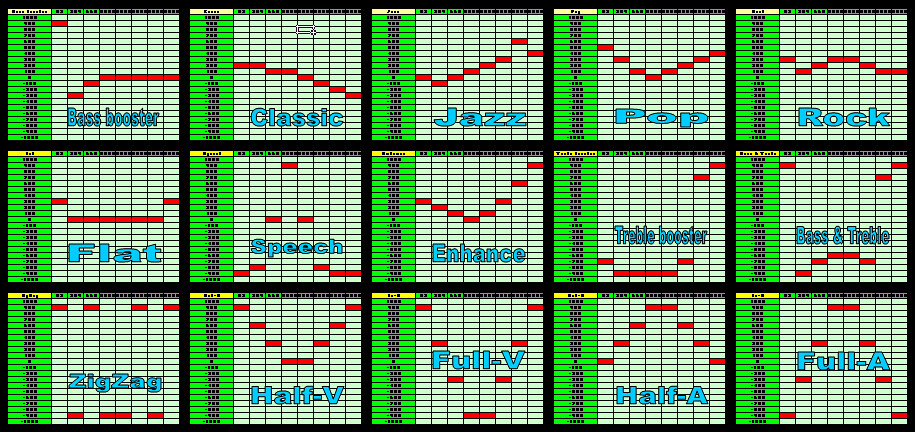
- Add in additional 10 EQ presets, Flat/Speech/Enhance/Treble booster/Bass & Treble/ZigZag/Half-V/Full-V/Half-A/Full-A

EQ Presets Overview

For Mods #46,#47,#48, ONLY select 1 option, if multiple options selected the top most option will be use.

46. Auto Landscape/Portrait Screen
- Add in lots of apps (>500 apps) UID into the default apps orientaion to follow the hardware accelerometer sensor.
(not all apps will follow as not all of them are follow the cenrep configurations, won't work for the Call Screen)

47. Permanent Landscape Screen
- Add in lots of apps (>500 apps) UID into the default apps orientaion to be in Landscape and disable the accelerometer sensor within the setting.
(not all apps will follow as not all of them are follow the cenrep configurations, won't work for the Call Screen)

48. Permanent Portrait Screen
- Add in lots of apps (>500 apps) UID into the default apps orientaion to be in Portrait and disable the accelerometer sensor within the setting.
(not all apps will follow as not all of them are follow the cenrep configurations)

49. Charger Note Disable Recommended!
- Disable the Charger notification note.

50. PwrSave Note Disable Recommended!
- Disable the Power Saving mode notification note.

51. Camera Digital Zoom Recommended!
- Enable the dafault camera apps to have Digital Extended Zoom capability.

52. Max Volume Recommended!
- Change most of the apps default volume setting to 100%.

53. Voice Recognition Improvement Recommended!
- Experimental mod, change the default Voice Recognition sensitivity and accuracy.

54. Default Profiles Fix Recommended!
- Enhance all profiles default setting, add in extra "In Office", "Driving", "Church", "Sleeping" profiles (useful if you have Nokia Situation installed)
(This mods changed all profiles able to "VIBRATE" although in Power Saver mode, but the mods will be reset IF you re-trigger the Power Saver manually ONCE)

55. Battery Level Fix Recommended!
- Change the default battery indicator from 100>70>50>40>30>20>10 to 100>80>65>50>35>20>10
(This mods only for eye candy, no real changes regarding the devices NON-Linear battery indicator behaviour)

56. Popup UI Improvement Recommended!
- Experimental mod, change the default Popup UI delay.

57. XCAP Cache Increase Recommended!
- Experimental mod, increased the XCAP Cache size.

58. Critical System Apps Recommended!
- Experimental mod, included RAMBlow, PocketSensor and PocketLock UID into the critical system apps list.

Anyway, To :

Uninstall the mods:

1. Use normal uninstall apps method to uninstall the mods.
2. REBOOT the phone.
3. All will back to original state.


Modify or Re-select the mods:

1. Use normal uninstall apps method to uninstall the mods.
2. REBOOT the phone.
3. Run the signed .sis.
4. Select the mods that you like to install.
5. REBOOT the phone.


Update mods version:

1. Use normal uninstall apps method to uninstall the old mods.
2. REBOOT the phone.
3. Run the signed up-rev .sis.
4. Select the mods that you like to install.
5. REBOOT the phone.

Enjoy it and Credits to the following modders/users for their efforts to make this multiple mods packages a reality Wink

Szakalit for the sources of EVERYTHINGS!
Faenil for the original H2O mods (the possibility of un-hacked installation)!
CODeRUS for the S60V5 cenreps documentations!
NP for the S60V5 cenreps documentations!
jnx_r for solutions on the installation bugs!
TrinityAlex for discovering the Startup/Shutdown mods typo error!
PimpJuice for the new KS Type B setting!

Wednesday, June 8, 2011

[Hacking] BOOM! RomPatcher3 for S^3 is live now !

Hello folks ! To continue the series of symbian^3 hacking and mods, it's time to present you the little bomb dropped by CODeRUS

Requirements :

- Hacked Symbian^3 device
- QT 4.7.3


RomPatcher3 for S^3 can:

- take patches from patches dir on drives Z, F, E, C

- apply good patches

- do not display bad patches

- autorun and apply patches

- show patches info


Tricks and tips:

- lamp-patch activator

- switcher-autostart

- duck-patch info

- other elements are texted =)


Something else:

- Application only for hacked S^3 phones

- Can be installed on any drive

- Drives have priority from Z to C

- Old symbian patches wont work

- New patches will be made as soon as possible

- Application include 2 patches: open4all and Remove Recording Tone

Tuesday, June 7, 2011

[Did You Know?] You Can Disable Active Diverts Note for S^3 ?

Hello folks ! To continue the series of symbian^3 hacking and mods, here's another mod by CODeRUS

Requirements :

- Hacked Symbian^3 device
- Modded R&D FileBrowser that comes with Just Hackit!

How To?

1- Download DisableActiveDivertsNoteS^3.zip or DisableActiveDivertsNoteAnna.zip (if you're running Anna update)
2- Unpack and copy it to C drive using modded R&D FileBrowser that comes with Just Hackit!
(be careful, and copy/overwrite each file(s) in dedicated folder on C)
3- Reboot and enjoy calling without annoying popup note

All credits goes to CODeRUS !

Sunday, June 5, 2011

[Hacking] SysAp 2.2 + Splashscreen for S^3

To continue the series of symbian^3 hacking and mods, here's another mod by CODeRUS

SysAp rebuilded from Source codes

Requirements :


- Hacked Symbian^3 device
- TweakS
- Modded R&D FileBrowser that comes with Just Hackit!

With this mod you can have control over :

- Charging/Battery low notes
- Automatically booting phone when charger connected to swithced-off phone
- FM transmitter on/off notifications
- Poversave Mode notifications
- Leave offline mode query to access network. For power key event.
- Bluetooth stays on when switching to offline mode
- !Reboot item for rebooting phone
- Poweroff NOKIA splash shows from c:/resource/apps/sysap.mif
- splashscreen shows NOKIA image when launching from c:/resource/apps/splashscreen.mif
- Automatically booting phone when alarm form switched-off state
- Fixed poweroff-splash. Rebooting much faster.
- Fixed many other mistakes.
- Recompiled using RVCT, code optimization.

How to?

- Unpack archive to C using modded R&D FileBrowser that comes with Just Hackit!
(be careful, and copy/overwrite each file(s) in dedicated folder on C) 
- Install TweakS (if not already done)
- Install sysap_coderus_en.twk plugin (you'll find it in the archive downloaded above) to TweakS (just click on file in file manager)
- Reboot phone at last.


(if tweakS will crash on some items after update select Clear option)

Who have last mod (domainsrv pack) already installed should move c:\sys\bin\domainsrv.exe first and reboot phone.

Enjoy !


Saturday, June 4, 2011

[Did You Know?] TweakS can tweak your device on the go !?

Compatibility : All hacked smartphones based on Symbian 9.1 - 9.4 and S^3

TweakS - is an innovative application for symbian devices, allowing easy to change parameters which were inaccessible earlier to editing in system.


It is a cover for plugins in which the description of options for editing is stored. plugins for the application are accessible to loading directly from the program. Also you can download plugins from website. Just click on the .twk file from filemanager for it's installing.


Each plugin contains a group of settings, grouped by purpose. Don't forget to read the description to options inside Option - Description before their change! As the important information on some options is written at a forum about the program.


Pay attention that some options in system can be initially locked. When you open it, application automatically will unlock them, then will suggest to make phone reboot. The locked parameters become accessible to editing after reboot.

Tuesday, May 31, 2011

[Did You Know?] Just HackIt! v1.1 can Hack all Symbian, including S^3 in 4 steps !

It's about time for me to back into hacking stuff for symbian after a sometime hack following of Maemo5 :

The hacking tools presented by CODeRUS, Kolay and stas686 from symbian-coderus allow you to get a full access to the phone's system files, with that capability, we can install a root certificate, and with the root certificate, we can install anything we want to mod the phone, include the Manufacturer capabilities requested apps !

0. Download this zip archive !
1. Sign CertHack_Installer with your own devcert.
2. Install CertUpdater
3. Install signed CertHack_Installer
4. Launch HackIt! by icon from menu.

 While hacking application installs FileBrowser for S^3 and RomPatcher for other phones it does a copy of installserver for 9.4 and S^3 phones.

If you getting any error just reboot phone and launch HackIt! again.

After successfully hacking delete HackIt! application if you want ^^

Stay tuned for some hacks to come !

Update : You can now Hack your symbian without PC & certificates !


Wednesday, March 9, 2011

[Did You Know] You Can Have Up To 6 Homescreens on your Symbian^3 device?

Hello folks !

Did you know you can have up to 6 screens in place of the 3 basic flash-free cell without Hacking your Symbian^3 device !?

CAUTION: This procedure will erase all settings of the phone! But not erase files or programs installed in C: \ or E: \!

All Credits goes to Random_user, Successfully tested on N8! Do not know if it works on other C7 or S3.


1-First download the file (PW: Random_User) and unzip the folder 200159c0 on the desktop
2-Connect your phone to your PC in Mass Storage mode (very important)
3-Enter the mass storage and go to: E: \ Private \ 200159c0
4-Copy the content of previously extracted (import and install) inside the folder E: \ Private \ 200159c0
5-Go to Settings> Phone> Phone Management> original settings> Restore

Done !

Tuesday, December 28, 2010

[Did You Know?] You can choose the mod you want without flashing Your N8?

Hello folks, new day, new tip !

Did you know that you can install separate mods and hacks to boost your N8 without the need to hack it or flashing it?

N8 Multiple Mods includes :

01. Landscape Dialer Mod

02. Gallery Folders Mod

03. Photo & Video Mods
- (Included the camera mute mod)
- (Change camera quality setting to 97/85/75 accordingly with more accurate estimated image size)
- (Change video/audio bitrate from 96kbps to 128kbps, 128kbps to 256kbps)

04. Continuous AF Mod
- (For close up object (10cm~1m) enable the CAF)
- (For normal video capture (>30cm) disable the CAF)

05. Context data object maximum size mod

06. Music Player Folders Mod

07. Music Player Heap 30Mb

08. Start/Shutdown animations and sounds (C:/Anim)

09. Browser's Cache Mod

10. Voice Recorder 5H 256kbps

11. UI Speed Mod

All you need is to

1. Download the attachment.
2. Sign the .sis with your own cert.
3. Run the signed .sis.
4. Select the mods that you like to install.
5. REBOOT the phone.

Uninstall the mods:

1. Use normal uninstall apps method.
2. REBOOT the phone.
3. All will back to original state.

Credit to Faenil for the original mods!

Questions? Probably i'll review each mod if i have some free time, but for now i want to keep my N8 "clean" ;)

Sunday, October 10, 2010

[How To] Record at 30Fps On the N8 an have 100% jpeg compression !

Well,  hyperX decided to make the hack public finally, so, as usual, you need to sign this sis before installing it to your N8 !! Don´t forget to REBOOT your device after installing this mod !

Thursday, October 7, 2010

Continues auto-focus for Video in Nokia N8 !

After the 30Fps hack, here's the Continues auto-focus enabler for Video in Nokia N8 by HyperX !


Tuesday, October 5, 2010

Nokia N8 is capable of recording high-res videos 720p at full 30fps !

He did it again ! hyperX has managed to hack the N8 : hx-custom-roms.com and now, the Nokia N8 is capable of recording high-res videos 720p at full 30fps and provide a RAW (uncompressed) photos !

No instruction for now, watch this space in the upcoming days !
