Showing posts with label Fremantle. Show all posts

Monday, February 1, 2010

Mac OS X 10.3 running on the N900 !

Full version of Mac OS X 10.3 running on the N900! I believe this makes the N900 the first smartphone EVER to run the full version of Mac OS X (at any speed, slow or otherwise). Youtube video below.


The emulator used was the latest CVS snapshot of PearPC.

Via : my-maemo and tuug

[Maemo 5 / N900 Apps] Remote Security : lock or unlock the N900 by sending to it an SMS or chat message !

Remote Security can locking the phone by sending sms/chat message. The package has :

1. rs - binary to listen incoming sms/chat messages
2. librsapplet.so - control panel applet to register lock/Unlock codes
3. librs.so - to provide common functionality for 1 and 2.


Ps : It's a very early (alpha) testing applet, so i don't recommand to install it, it still has some issues, wait a few days, new packages will be released ;)


Via : talk.maemo.org

[Maemo 5 / N900 How To] Disable Auto Updates Check

You may want to disable the automatic software updates checks that occur upon internet connection, in order to consume less bandwidth when using 2G/3G connections. 

You can do so by editing the gconf file found in /var/lib/gconf/apps/hildon/update-notifier and changing the check interval from 1440 (24 hours) to a much larger value. The value must not exceed 4,294,967,295.

Sunday, January 31, 2010

[Maemo 5 / N900 How to] Change the boot splash video !

I don't know if you're in touch, but as other Maemo's hacks, it is possible to edit hildon-welcome screen, in case you don't know ho to do it :

1- Copy the video to /usr/share/hildon-welcome/media
2- Go to /etc/hildon-welcome.d/ and edit the default.conf file or create a similar one (the videos will play by the alphabetic order of the .conf files)

In case you don't want to do the Step 2, simply rename your video file into Hands-v32-h264.avi and overwrite the original one in Step 1 ;)

Some examples here and here.

Via : talk.maemo.org

Saturday, January 30, 2010

[Maemo 5 / N900 Apps] Facebook Chat plugin for Pidgin

Facebook Chat plugin for Pidgin is a Facebook chat plugin for Pidgin and libpurple messengers. It connects to the new Facebook Chat IM service without the need for an API key.

Currently the plugin can log into the Facebook servers, grab the buddy list, send/receive messages, add/remove friends, receive notifications, search for Facebook friends and set your Facebook status.

Of course, it's integrated to your contact list like any other plugin ! Well i didn't tested that one, i'm waiting for the haze's one ;)

You can download it from the Extras-devel repository !

[Maemo 5 / N900 Apps] : Firefox 1.0 goes live !

The first final official release of Firefox for Maemo is live now, go to firefox.com/mobile to download it !

Note : that the flash is disabled in this release too !!

"The Adobe Flash plugin used on many sites degraded the performance of the browser to the point where it didn’t meet Mozilla’s standards."

Anyway, here's the PR :


Firefox for mobile is packed with your favorite features, including:
  • Awesome Bar – Go to your favorite sites in just a couple of keystrokes with intelligent and personalized searching
  • Weave Sync – Sync your Firefox tabs, history, bookmarks and passwords between your desktop and mobile device for a seamless browsing experience
  • Add-ons – Customize your Firefox by adding small pieces of functionality, like games and news readers, that help make the mobile Web browser your own
  • Location-Aware Browsing – Get maps and information relevant to your location
  • Tabbed browsing – View open tabs as thumbnails to easily identify and select the Web page you’d like to go to next
  • Safe Browsing – Get an Instant Web Site ID and easily access and edit security settings
  • Available in more than 30 languages and counting
Firefox is the first mobile Web browser to support add-ons. With add-ons, you can customize your Firefox by adding features that help make your browser your own. Add-ons like AdBlock Plus, URL Fixer, TwitterBar, language translators, and geo guides become especially handy when you’re out and about on your mobile device. You can both discover and install add-ons directly from your Nokia N900. There are currently more than 40 Firefox add-ons available for mobile and the number is growing every day.
We strongly recommend that you install the YouTube Enabler add-on from within the Add-ons Manager.  Tap on the install button, restart Firefox, and you’re all set to watch YouTube videos.
Just as Firefox does for the desktop, Firefox for mobile provides a platform for developers to create rich applications. Developers can use the latest Web technologies like HTML5, CSS and JavaScript to improve, modify and customize the browser. Visit the Develop for mobile page to learn more.
Firefox is currently supported on Nokia’s Maemo5 platform and is available for download on the Nokia N900. Users can download and learn more by visiting Firefox.com/mobile. Visit the FAQ for more information.

[Maemo 5 / N900 Apps] ActionManager : select an action to a (system) trigger !

The ActionManager lets a user select an action to a (system) trigger. Eg.: A trigger like headphone plugin/pullout or battery fully charged to an action like MediaPlayer Pause/Play, selecting a (system) profile.

Imagine, by using the GPS, a trigger can be defined when your (N900) is near a specific GPS location. An action to respond on the trigger can be playin a sound : I'm using the train to go back home, but I'm very sleepy. When I fall a sleep by accident, I want to wake up just before I arrive on my destination. The wakeup signal can be playing a sound, or other... ! Something like that (not implemented yet, just an example)

Currently it does pause the mediaplayer when disconnecting the headphone and start playing again when connected like (in one way) headphoned somehow.

Friday, January 29, 2010

[Maemo 5 / N900 Apps] Extended Call Log, Finally, almost !

Self explanatory, as i mentioned on my N900's Contacts and Phone review,  phone app lacks a detailed call log especially when the same person calls, ECL also can arrange call log in dialed, received, missed calls, took a few kbs on rootfs not a biggie, worth loading ;)


You can download it on extras-devel repository !

[Maemo 5 / N900 Apps] File Transfers : Send files to your instant messaging contacts !

File Transfers is a user interface that allows you to send files to your instant messaging contacts


You can download it from Extras-devel repository !

More to read !

Thursday, January 28, 2010

[Maemo 5 / N900 Apps] Firefox for Maemo v.1.0 RC3 released !

Firefox for Maemo has got another update, check out what’s new :

Improvements to Performance and Productivity
For our third release candidate of Firefox for Maemo, we put a lot of emphasis on improving overall performance: Web pages load significantly faster than RC2. Panning is more responsive and zooming in on Web pages is much faster. The Awesome Bar will now pop up much faster when you tap on it.
Plugins Disabled to Improve User Experience
Support for plugins has been disabled. On most Web pages that use the Adobe Flash plugin, the performance of the plugin didn't meet our standards, and the interactivity and performance of the entire Web page was negatively impacted, especially on pages with multiple instances of the plugin. Advanced users can enable plugins for experimentation and testing purposes only. We are working on ways for the user to have control of which sites to enable plugins for, as some sites, like YouTube, do work quite well. That capability will most likely be packaged as a browser add-on.
Firefox is currently supported on Nokia’s Maemo platform, available for download on the Nokia N900. Initially available in more than 30 languages, download and learn more by visiting Firefox.com/mobile.
You'll see many of your favorite features for the desktop Firefox, now optimized for an exceptional mobile experience:
Easy Navigation to Web Content
  • Awesome Bar: The Smart Location Bar, or "Awesome Bar" is even more awesome on a mobile device. The Awesome Bar gets you to your Web destination with minimal typing, by intelligently searching the names, URLs and tags of the sites you visit, and takes into account how often and recently you visit them. With Weave Sync, the Awesome Bar will also search the Web history from Firefox on your PC
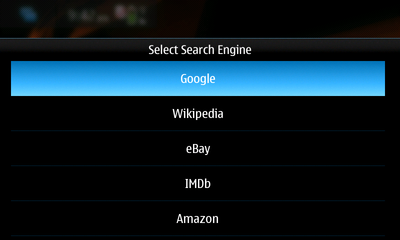
  • Easy access to many search engines: Type your search term right in the Awesome Bar to search Google. Or send your search to another search engine (Wikipedia, Amazon.com, Twitter) with one touch. Customize with the search engines of your choice.
Touch Interface Optimization
  • Touch-enabled UI: Greatly improved panning and scrolling performance bug 539062
  • View without obstructions: The browser controls and Awesome Bar get stowed away when you reach your website so you can use the whole screen to view the site. Start to pan up or to the sides and your controls and Awesome Bar reappear
  • Quick zoom: Double tap on the screen to zoom in, double tap to zoom back out
  • One-touch bookmarking: Bookmark a Web site in one touch, along with the ability to tag it with a memorable term
  • Tabbed browsing: Thumbnails of your open tabs easily identify your open pages.
Performance
  • Modified Content Sink preference has significantly decreased page load time bug 538655
  • Use of a new, less animated page load throbber decreased page load time by another 10-15% bug 539495
  • Double-tap to zoom is much faster bug 537660
  • Greatly improved panning and scrolling performance bug 539062
Seamless Synchronization
  • Weave Sync: Create a Weave Sync account on your desktop and install the Weave Sync add-on on your mobile to synchronize your Firefox tabs, passwords, history and bookmarks between your desktop and mobile
  • Less typing: Access Firefox for mobile’s Awesome Bar and visit any site you’ve ever been to, regardless of which computer you visited it on, with just a couple keystrokes
  • Don't start from scratch: Weave Sync brings along your saved passwords from your desktop, removing barriers to your favorite sites
  • Get up and go: Take your Firefox with you wherever you go. Surf the Web on your PC, get up and go, and have everything waiting for you on your phone -- even your open tabs.
A Personalized Experience
  • Add-ons: Firefox is the first mobile Web browser to support add-ons. You can view recommended add-ons in the Add-ons Manager and install them directly from your mobile device
  • Location-Aware Browsing: Be a local wherever you are. Get maps and info relevant to your location. Its all optional– Firefox doesn’t share your location without your permission– and is done with the utmost respect for your privacy.
Private and Secure
  • Instant Web site ID ("Larry"): Tap on a site favicon for an instant identity overview
  • Password manager: Typing passwords on your phone is hard, so why do it more than you have to? Choose to remember site passwords and forget ever having to endure long and difficult typing
  • Popup blocker: Banish pop-ups from your surfing experience once and for all
  • Clear private data: As an extra security measure, you can clear all your private data via your Preferences
  • Customized security settings: Customize settings for passwords, cookies, loading images and installing add-ons for a fully empowered mobile browsing experience
  • Automated Update: Install upgrades directly to your device when you receive an automatic notification, or wait until you’re ready.
Productivity
  • The Awesome Bar will now pop up much faster when you tap on it bug 536368
  • Preferences pane: Go to your Preferences in one touch. From here, manage your plugins and security settings, as well as access your Downloads Manager and Add-ons Manager
  • Download manager: Download files seamlessly and securely. The manager shows your download progress and lets you search your files by name or the Web address where the download came from
  • Spell checker: Catch typos and misspellings in form fields.

[Maemo 5 / N900 How to] Browse the whole file system with the web browser !

The built-in web browser can also be used as a simple "file manager" letting you browse the entire file system and view contents of files.

Simply type file:/// in the browser's address bar.

Seen @ : my-maemo

Wednesday, January 27, 2010

[Maemo 5 / N900 Apps] TuneWiki SMP : Brings media player, youtube, shoutcast and lyrics !

Have you ever wondered "what is she singing?", or just wanted to read the lyrics of your favorite artist? Then TuneWiki Social Music Player is the app for you. TuneWiki combines a global community of music lovers with the most advanced music player in the world, allowing you to view lyrics in 'karaoke' style, see what others play around you, understand the lyrics in languages other than your own and check who else plays the music you play - around the corner or around the globe.


You may already have the TuneWiki widget that shows you the lyrics from songs you have loaded and play on your device, but this new application also lets you play Internet radio and watch music videos with lyrics.


Awesome !

You can download it now from the Ovi Store.

Via : thenokiablog

[Maemo 5 / N900 Apps] TouchSearch 2.1-2 Now Available !

TouchSearch has got a major upgrade for those using 1.3-2. Many things were changed, most notably the look and feel of the widget. Gone is the (admittedly, ugly!) black box background and in is a very sleek semi-transparent background that is more consistent with the look of the built-in desktop widgets :


Also new in this version is the Configure Search Engines interface. This is available from the Widget Options and allows you to create, edit, delete and sort your search engines. Beware though, that the Add Search Engine option is still a bit untested and you may run into a few hiccups while trying to add search engines.


Here is the full changelog for those wondering :

- User can now Add, Edit, Delete and Sort search engines
-  Widget now features a background with rounded corners and user-selectable opacity
- New integrated help system
- Added WebMD to search engines list
- Numerous bug-fixes and optimizations.

Via : maemomagazine

[Maemo 5 / N900 Apps] Simple FMTX desktop widget : FM-Transmitter enabler/disabler widget

Simple FMTX is a simple FM-Transmitter enabler/disabler desktop widget to enable or disable FM-Transmitter.


You can also change frequency and enable "boost" function (In case of transmitter power drain's level).

Tuesday, January 26, 2010

[Maemo 5 / N900 Apps] Screenshots Preview of Joikuspot

You can see already some screenshots of the upcoming Nokia N900's Joikuspot release !

Check it out :


Via : facebook

[Maemo 5 / N900 Apps] Mussorgsky 0.4 : Metadata editor !

Mussorgsky is a tool to set the basic metadata in the audio files so the music collection management can be done completely on the maemo device, without the help of a desktop computer.

In fremantle/maemo5 we have tracker to retrieve the information of the music files and make the life of Music Player developers easier. It is really cute to browser your music “by artist”  but in my case (and i guess i am not the only one) the metadata of my music files is far from perfect and unified (songs without title, without album, misspellings in artists names, no album art at all and so on). There are a lot of programs out there to fix this problem (e.g easytag) but they all require a PC, and i want to edit this stuff directly on the tablet !
Some features that should help you to have a even more beautiful Album view in your N900 media player:

- By default mussorgsky uses “artist + album” to search online for the album art. Now it is possible to choose manually the search string to find better results:


- Added the alternative to unset the album art, reverting it to the default icon
- The list of songs can be filtered, switching between “all songs” or “songs with incomplete metadata”
- Albums with special characters in their name (like ‘&’) are now handled correctly.

And few UI improvements here and there:

- The buttons in the main screen have now shadows with rounded corners when clicked
- The play, next, back buttons in the edit view come from the mediaplayer theme
- When a song has no metadata at all, it is listed using its filename

It is already available in extras-devel, hope you enjoy it. And finally, thanks to Eric, Aapo and Claudio for their very valuable comments and help!

Via : dz015

Monday, January 25, 2010

[Maemo 5 / N900 How to] Change battery and signal icons !

Heres a signal and battery mod, interesting to match the default "blue" theme (Don't be ashamed, You can share your layouts too) !

Signal images go in /usr/share/icons/hicolor/scalable/hildon
Battery1 images go in /usr/share/icons/hicolor/scalable/hildon


Battery2 images go in /usr/share/icons/hicolor/48x48/hildon/


You can access these paths as showed here ;)

Ps : icon pack includes original icons also.

Seen over symbianscientist

Sunday, January 24, 2010

[Maemo 5 / N900 Apps] Salling Media Sync 1.1.5 version supports Nokia N900 !

Salling Software AB on Wednesday updated its application for syncing media from iTunes and compatible photo applications to mobile devices. The new version is compatible with Adobe Photoshop Elements 8 (Windows version only) and some of the hottest new phones, including Google Nexus One, Motorola DEXT, T-Mobile Motorola CLIQ, and Nokia N900. A full list of supported devices is available at http://www.salling.com/mediasync/compatibledevices/

Salling Media Sync couldn't be easier to use. Once the phone is connected to a USB port, the users simply select the playlists, podcasts and photo albums they want on the device. Salling Media Sync not only uploads the music tracks and podcast episodes, but also replicates each actual playlist on the device and—on devices that support it—transfers play count metadata for each item to the device, reinforcing the sense of having a piece of iTunes in your pocket.

Salling Media Sync 1.1.5 is available now through Salling Software's web site (http://www.salling.com) at no cost for basic use.

At a price of $22/€15 per user license, the application intelligently updates your phone, resulting in faster syncs. Windows and Mac licenses are sold separately, and the bundle can be bought at a 25% discount.

Salling Media Sync for Windows is compatible with Windows XP SP2 (with Windows Media Player 11) or better, iTunes 7.6.x - 9.0.2 (for music and podcasts), and Adobe Photoshop Album SE 3.2 or Adobe Photoshop Elements 6.x - 8.x (for photos).

Salling Media Sync for Mac is compatible with Mac OS X 10.4.11 or better, iTunes 7.6.x - 9.0.2 (for music and podcasts), and iPhoto '08 - '09 or Aperture 2.x (for photos).

Please see http://www.salling.com/MediaSync/ for details.

Saturday, January 23, 2010

[Maemo 5 / N900] Android (Donut) boots on the n900 !

Good news. Android (Donut) boots on the n900 using bootmenu (using the maemo kernel with the android drivers patched in !)


Via : talk.maemo.org

[N900 REVIEW] Part 12 : Final thoughts !

After this full N900's coverage, i can say that the Nokia N900 is different from anything else i have seen recently in the touch phone market. Better yet, it's different with a purpose. The Maemo platform is all about simplicity and multitasking !

In my personal opinion, the N900 is completely successful. The hardware is powerful enough, the operating system is set up fast, stable and logical. There is a large community that already makes vast amounts of software.

The best web browser and the best multi-tasking and instant messaging experience of any comparable device out there right now !

Maemo does take some getting used to, especially if you’re coming to it from a Symbian device, but, invest the time to learn all the neat tricks and extra features and you will be handsomely rewarded ;)

Build quality is second to none. The N900 gives an impression of raw power, both inside and out.

The camera is slightly under supported when compared to rivals on the market. Nokia have never been known to overload a camera with features but simple additions such as face and smile detection and a Xenon flash would have been welcome ones...

The built in GPS receiver is aided by A-GPS (assisted GPS). These two combine to give the N900 an incredibly quick response time when opening the Ovi Maps application. Upon opening the app, the N900 pinpoints your location almost instantly and despite being inside a building (which can hamper the GPS signal) found our location correctly almost to the meter.

Then, the operating system is fresh, intuitive and begging to be explored and really does succeed in putting a desktop experience in the palm of your hand whilst the device itself is well made, well designed and loaded with features that will come in handy for both work and play.

What's hot :

- Lens shutter manage to keep the lens clean
- The micro USB port (which doubles as the charger connection)
- Good level of feedback and a quality feel.

- There's none of the S60 one-click-here-two-clicks-there inconsistency to be witnessed with the Linux-based platform.
- Clicking somewhere outside to get the main menu or going back a step
- Three levels organization of the UI rather than two. (The extra step added between the homescreen and the main menu is reserved for the task manager, so you'll always have your open applications at hand).
- 4 side-scrollable fully customizable screens/desktop
- Plainness of the homescreen management
- Best resistive screen on the ever had yet ! and one of the sharpest ones
- Task switcher as the Maemo OS cornerstone
- Kinetic scrolling
- Very rich status bar
- a decent amount of eye-candy with the main screen getting out of focus when a dialog pops-up (Apps also disappear with nice effect when closed from the task bar and the automatic rotation in the phonebook is pretty nice)
- N900 always remembers in which home screen you were recently using and it will always show it, even after you reboot the device.

- Full integration between mobile and VoIP telephony is really impressive
- Mature support for telephony when comparing to previous tablets.
- Turn-to-mute feature
- Turning control feature
- Merge Contacts feature
- Among strongest native support of contacts synchronization with plethora of options

- Calendar works well and is very usable and viewable on the excellent N900 display.
- Multiple calendar support and management.
- Alarms are disabled by default for birthdays.
- Smart Calendar (birthdays) enable to sync with contacts.
- Option to select which calendar a Note is associate with.
- Turn- to-snooze feature for alarm application

- Virtual QWERTY keyboard for text input in addition to the regular one
- Native HTML support for the Email client
- Powerful IM support and integration
- Smilies integration
- Personal status with your geographical coordinates support !

- Support of Flash 9.4
- Support of Adds-on
- Support of multiple windows
- Support of copy/paste
- Interactive mode

- Default audio quality is good in comparison with other Nokia's brand
- FM Transmitter
- DivX and XviD videos support out of the box
- WVGA display provides excellent clarity, detailness and resolution, and the playback is smooth enough
- Kickstand
- UPnP client easy to set up (all set up should be done from pc's server)
- Internet radio out of the box


- Quality of stills and videos is really a very decent one
- Tag filtering offers you a great way to quickly find your photos
- Geotagging feature works flawlessly
- Many sharing possibilities
- Fast browsing
- Auto pre-focus on video mode
- Installing an application is pretty easy
- Powerful hardware as enabler for huge developer community
- Possibility to add as many applications repositories as available
- Automatic notification of available update including the firmware's one
- Restoring a backup make the App Manager redownload your software from the repositories (with latest versions)

- Highest transfer speed on a device until the time i'm writing this !
- More than one way to grab and keep your data up to date
- UDP Support

- GPS receiver very sensitive
- Battery life not "bad" as that !

What's Not :

- The microSD slot is hidden under the rear pane
- Resistive screen (i still love manipulate my Omnia HD)
- Volume (mainly, thickness side)
- Hardware screen/key lock that is located at a very odd position
- Lack of "full" qwerty keybord
- Battery cover removing system

- The lack (at the moment) of portrait mode in the whole interface (after all this is a phone too, isn't it?).
- Scrollable screens in horizontal only.
- I wished if there was a capacity screen instead (you know it matches very well with the kinetic scrolling).
- The lack of Multi-select feature in some applications (email, for example)

- No option to assign specific ringtones to particular contacts
- No option to scroll contacts with the help of the arrow keys of the QWERTY keybord
- No alphabetical search in contact application (except in portrait mode)
- No option to multi-select different contacts in order to interact with them (like a Symbian device)
- Weak call log
- "Introductory" attempt to implement telephony when comparing to a Symbian device.
- Contacts fields are not renameable like on S60 OS
- No Option to select a standard number for SMS or call !


- Smart Calendars (birthdays) doesn't allow to call or text the call the contact directly from the event's entry
- Google Synchronisation is currently not (directly) supported.
- There are no custom recurrence options such as every Monday and Wednesday, etc.
- Tasks part of the application is a basic utility that doesn’t give you any priority setting or other functionality
- Handwritten notes are not supported
- No native MMS support.
- No option to sort conversations (by sender, time, nicknames etc.)
- No option to create folders for conversations.
- No handwriting recognition though, despite there's a stylus onboard.
- No option to get only the headers of emails if you're stingy with the data traffic.
- No option to subscribe IMAP folders yet.
- Swirl to zoom feature is slow to be useful. You need to make four or five circles instead of two short taps.
- Some compatibility issues with flash videos other than Youtube
- No equalizer
- No decent FM Radio out of the box
- No advanced video tagging like on the photos viewer
- Despite the sound is clear, stereo speakers are somehow weak (volume, bass rendering) from what we saw in other N-Series
- Built-in media player is a UPnP/DLNA client only
- No self-timer
- No advanced mode (for still photos and video capture)
- No alternative resolutions
- No LED flash as a video light assistant when recording in low light conditions
- No 3D-view or some Cover Flow-like animation
- Portrait and landscape mode aren't automatically alternated
- The only way to zoom in and out is by using the volume rocker key
- The availability of third-party apps
- The lack of automatic notification for new applications (out of the box)
- No automatic backup schedule (daily, weekly etc) like on Symbian
- No multimedia or photo transfer mode for USB event.
- No possibility to import SMS from other devices
- Sync issues between two N900 (will upload a demo when i'll have a correct internet connection)
- Lack of digital compass so, no Augmented Reality style apps i guess
- Lack of voice-guidance