Showing posts with label Web / Internet Related Application. Show all posts

Saturday, June 18, 2011

Nokia Search : universal search app coming soon?


There is now a new private project launched by Nokia Beta Labs. The application, called Nokia Search, should not be anything but a strong universal implementation of the famous study of Symbian

Much like the universal search apps built into many smartphone platforms, including iOS, Android, webOS, and Windows Phone, Nokia's search app for Symbian allows users to search for things stored locally on their phones, as well as on the greater web. It will surface relevant contacts, settings, apps, webpages, map listings, and more with just a few letters of a query.

There is a homescreen widget with an easy-to-access search box to make it quick and simple to perform searches. Below the search box is a dynamically changing list of most commonly used apps and popular contacts.

Thursday, October 28, 2010

Video Of The Long Awaited Nokia N8 New Improved Web Browser !

The guys over mynokiablog have got a demo video for what it seems to be the upcoming updated Web Browser for the Nokia N8, demo after the break !


And as you can see, the home screen transition is more "finger-following" which is nice to see, we talk about the PR2.2 firmware here ;)

What do you think?

Sunday, February 28, 2010

gStorage : Use Gmail as a network !

gStorage is a file management tool, which can be used to manager your local files in a mobile phone and network files in a remote storage space. Currently, it supports those files(attachments) in your Gmail box. As we all know, the storage capacity of one free Gmail box is considerably large, up to 7Gb for the moment, and can be upgraded to 400Gb.


So, with this tool, you will get a large enough disk for your phone right now. It easily converts your Gmail box to a local mapped drive and you can exchange data with your Gmail box. Another way to extend the capacity for your phone is applying for another free Gmail box, but this requires you maintaining additional accounts.

At a default installation, this software is a freeware with a little limitation -- the total size of files to be sent or downloaded should be not more than 500Kb. If you like this tool and support its continuous development, please consider requesting a license which can remove that limit by just paying a one time fee for your phone(IMEI is required, press "*#06#" to get it in your phone). When using network file management functions in this software, it may cause network fees via some kinds of bearers, determined by your local network service provider. You should be aware of this in advance.

Download it !

Monday, February 1, 2010

[Maemo 5 / N900 How To] Disable Auto Updates Check

You may want to disable the automatic software updates checks that occur upon internet connection, in order to consume less bandwidth when using 2G/3G connections. 

You can do so by editing the gconf file found in /var/lib/gconf/apps/hildon/update-notifier and changing the check interval from 1440 (24 hours) to a much larger value. The value must not exceed 4,294,967,295.

Saturday, January 30, 2010

[Maemo 5 / N900 Apps] : Firefox 1.0 goes live !

The first final official release of Firefox for Maemo is live now, go to firefox.com/mobile to download it !

Note : that the flash is disabled in this release too !!

"The Adobe Flash plugin used on many sites degraded the performance of the browser to the point where it didn’t meet Mozilla’s standards."

Anyway, here's the PR :


Firefox for mobile is packed with your favorite features, including:
  • Awesome Bar – Go to your favorite sites in just a couple of keystrokes with intelligent and personalized searching
  • Weave Sync – Sync your Firefox tabs, history, bookmarks and passwords between your desktop and mobile device for a seamless browsing experience
  • Add-ons – Customize your Firefox by adding small pieces of functionality, like games and news readers, that help make the mobile Web browser your own
  • Location-Aware Browsing – Get maps and information relevant to your location
  • Tabbed browsing – View open tabs as thumbnails to easily identify and select the Web page you’d like to go to next
  • Safe Browsing – Get an Instant Web Site ID and easily access and edit security settings
  • Available in more than 30 languages and counting
Firefox is the first mobile Web browser to support add-ons. With add-ons, you can customize your Firefox by adding features that help make your browser your own. Add-ons like AdBlock Plus, URL Fixer, TwitterBar, language translators, and geo guides become especially handy when you’re out and about on your mobile device. You can both discover and install add-ons directly from your Nokia N900. There are currently more than 40 Firefox add-ons available for mobile and the number is growing every day.
We strongly recommend that you install the YouTube Enabler add-on from within the Add-ons Manager.  Tap on the install button, restart Firefox, and you’re all set to watch YouTube videos.
Just as Firefox does for the desktop, Firefox for mobile provides a platform for developers to create rich applications. Developers can use the latest Web technologies like HTML5, CSS and JavaScript to improve, modify and customize the browser. Visit the Develop for mobile page to learn more.
Firefox is currently supported on Nokia’s Maemo5 platform and is available for download on the Nokia N900. Users can download and learn more by visiting Firefox.com/mobile. Visit the FAQ for more information.

Friday, January 29, 2010

[Maemo 5 / N900 Apps] File Transfers : Send files to your instant messaging contacts !

File Transfers is a user interface that allows you to send files to your instant messaging contacts


You can download it from Extras-devel repository !

More to read !

Thursday, January 28, 2010

[Maemo 5 / N900 Apps] Firefox for Maemo v.1.0 RC3 released !

Firefox for Maemo has got another update, check out what’s new :

Improvements to Performance and Productivity
For our third release candidate of Firefox for Maemo, we put a lot of emphasis on improving overall performance: Web pages load significantly faster than RC2. Panning is more responsive and zooming in on Web pages is much faster. The Awesome Bar will now pop up much faster when you tap on it.
Plugins Disabled to Improve User Experience
Support for plugins has been disabled. On most Web pages that use the Adobe Flash plugin, the performance of the plugin didn't meet our standards, and the interactivity and performance of the entire Web page was negatively impacted, especially on pages with multiple instances of the plugin. Advanced users can enable plugins for experimentation and testing purposes only. We are working on ways for the user to have control of which sites to enable plugins for, as some sites, like YouTube, do work quite well. That capability will most likely be packaged as a browser add-on.
Firefox is currently supported on Nokia’s Maemo platform, available for download on the Nokia N900. Initially available in more than 30 languages, download and learn more by visiting Firefox.com/mobile.
You'll see many of your favorite features for the desktop Firefox, now optimized for an exceptional mobile experience:
Easy Navigation to Web Content
  • Awesome Bar: The Smart Location Bar, or "Awesome Bar" is even more awesome on a mobile device. The Awesome Bar gets you to your Web destination with minimal typing, by intelligently searching the names, URLs and tags of the sites you visit, and takes into account how often and recently you visit them. With Weave Sync, the Awesome Bar will also search the Web history from Firefox on your PC
  • Easy access to many search engines: Type your search term right in the Awesome Bar to search Google. Or send your search to another search engine (Wikipedia, Amazon.com, Twitter) with one touch. Customize with the search engines of your choice.
Touch Interface Optimization
  • Touch-enabled UI: Greatly improved panning and scrolling performance bug 539062
  • View without obstructions: The browser controls and Awesome Bar get stowed away when you reach your website so you can use the whole screen to view the site. Start to pan up or to the sides and your controls and Awesome Bar reappear
  • Quick zoom: Double tap on the screen to zoom in, double tap to zoom back out
  • One-touch bookmarking: Bookmark a Web site in one touch, along with the ability to tag it with a memorable term
  • Tabbed browsing: Thumbnails of your open tabs easily identify your open pages.
Performance
  • Modified Content Sink preference has significantly decreased page load time bug 538655
  • Use of a new, less animated page load throbber decreased page load time by another 10-15% bug 539495
  • Double-tap to zoom is much faster bug 537660
  • Greatly improved panning and scrolling performance bug 539062
Seamless Synchronization
  • Weave Sync: Create a Weave Sync account on your desktop and install the Weave Sync add-on on your mobile to synchronize your Firefox tabs, passwords, history and bookmarks between your desktop and mobile
  • Less typing: Access Firefox for mobile’s Awesome Bar and visit any site you’ve ever been to, regardless of which computer you visited it on, with just a couple keystrokes
  • Don't start from scratch: Weave Sync brings along your saved passwords from your desktop, removing barriers to your favorite sites
  • Get up and go: Take your Firefox with you wherever you go. Surf the Web on your PC, get up and go, and have everything waiting for you on your phone -- even your open tabs.
A Personalized Experience
  • Add-ons: Firefox is the first mobile Web browser to support add-ons. You can view recommended add-ons in the Add-ons Manager and install them directly from your mobile device
  • Location-Aware Browsing: Be a local wherever you are. Get maps and info relevant to your location. Its all optional– Firefox doesn’t share your location without your permission– and is done with the utmost respect for your privacy.
Private and Secure
  • Instant Web site ID ("Larry"): Tap on a site favicon for an instant identity overview
  • Password manager: Typing passwords on your phone is hard, so why do it more than you have to? Choose to remember site passwords and forget ever having to endure long and difficult typing
  • Popup blocker: Banish pop-ups from your surfing experience once and for all
  • Clear private data: As an extra security measure, you can clear all your private data via your Preferences
  • Customized security settings: Customize settings for passwords, cookies, loading images and installing add-ons for a fully empowered mobile browsing experience
  • Automated Update: Install upgrades directly to your device when you receive an automatic notification, or wait until you’re ready.
Productivity
  • The Awesome Bar will now pop up much faster when you tap on it bug 536368
  • Preferences pane: Go to your Preferences in one touch. From here, manage your plugins and security settings, as well as access your Downloads Manager and Add-ons Manager
  • Download manager: Download files seamlessly and securely. The manager shows your download progress and lets you search your files by name or the Web address where the download came from
  • Spell checker: Catch typos and misspellings in form fields.

Wednesday, January 27, 2010

[Maemo 5 / N900 Apps] TuneWiki SMP : Brings media player, youtube, shoutcast and lyrics !

Have you ever wondered "what is she singing?", or just wanted to read the lyrics of your favorite artist? Then TuneWiki Social Music Player is the app for you. TuneWiki combines a global community of music lovers with the most advanced music player in the world, allowing you to view lyrics in 'karaoke' style, see what others play around you, understand the lyrics in languages other than your own and check who else plays the music you play - around the corner or around the globe.


You may already have the TuneWiki widget that shows you the lyrics from songs you have loaded and play on your device, but this new application also lets you play Internet radio and watch music videos with lyrics.


Awesome !

You can download it now from the Ovi Store.

Via : thenokiablog

Tuesday, January 26, 2010

[Maemo 5 / N900 Apps] Screenshots Preview of Joikuspot

You can see already some screenshots of the upcoming Nokia N900's Joikuspot release !

Check it out :


Via : facebook

Sunday, January 24, 2010

[Maemo 5 / N900 Apps] Salling Media Sync 1.1.5 version supports Nokia N900 !

Salling Software AB on Wednesday updated its application for syncing media from iTunes and compatible photo applications to mobile devices. The new version is compatible with Adobe Photoshop Elements 8 (Windows version only) and some of the hottest new phones, including Google Nexus One, Motorola DEXT, T-Mobile Motorola CLIQ, and Nokia N900. A full list of supported devices is available at http://www.salling.com/mediasync/compatibledevices/

Salling Media Sync couldn't be easier to use. Once the phone is connected to a USB port, the users simply select the playlists, podcasts and photo albums they want on the device. Salling Media Sync not only uploads the music tracks and podcast episodes, but also replicates each actual playlist on the device and—on devices that support it—transfers play count metadata for each item to the device, reinforcing the sense of having a piece of iTunes in your pocket.

Salling Media Sync 1.1.5 is available now through Salling Software's web site (http://www.salling.com) at no cost for basic use.

At a price of $22/€15 per user license, the application intelligently updates your phone, resulting in faster syncs. Windows and Mac licenses are sold separately, and the bundle can be bought at a 25% discount.

Salling Media Sync for Windows is compatible with Windows XP SP2 (with Windows Media Player 11) or better, iTunes 7.6.x - 9.0.2 (for music and podcasts), and Adobe Photoshop Album SE 3.2 or Adobe Photoshop Elements 6.x - 8.x (for photos).

Salling Media Sync for Mac is compatible with Mac OS X 10.4.11 or better, iTunes 7.6.x - 9.0.2 (for music and podcasts), and iPhoto '08 - '09 or Aperture 2.x (for photos).

Please see http://www.salling.com/MediaSync/ for details.

Saturday, January 23, 2010

[Maemo 5 / N900 How to] Control your N900 From Your Computer and Vice Versa With VNC !

In computing, Virtual Network Computing (VNC) is a graphical desktop sharing system that uses the RFB protocol to remotely control another computer. It transmits the keyboard and mouse events from one computer to another, relaying the graphical screen updates back in the other direction, over a network.


For that, if you want to view and control your pc/laptop from the N900, all you have to do is to :

1 - Get a vnc-server (the program on the machine that shares its screen. The server passively allows the client to take control of it.) like tightvnc (I'm using TightVNC Server. It works great!) or realvnc, install it on your laptop, set up a password, and add the tablet to the list of allowed hosts (plenty of documentation for that available on the net). 

2 - Then you fire up vncviewer (VNC client (or viewer) is the program that watches, controls, and interacts with the server. The client controls the server.) on the N900 (it's in extras-testing repository) and connect to :0 (For eg. 192.168.1.4:0) where

- 192.168.1.4 describes you laptop/pc ip address.

- ":0" describes the screen you want to connect to, under unix it's not uncommon to have several X Servers running, which would be adressed by :1, :2 and so on, but under windows there's usually only one, hence ":0".


You'll get a touchscreen user interface of your desktop, so you just click / drag etc on the screen...

For the other way round (controlling / viewing your N900's desktop from your laptop), it's basically the same :

- You just fire up x11vnc on the N900 (the default setting is without password, and to close after one session, so you have to start x11vnc every time you want to connect, unless you set it up to start automatically, but then you also want a password, and it gets a bit more involved). Then use vncviewer (tightvnc viewer for example works great for that) on your laptop to connect to :0 (you might have to add the IP address of your N900 followed by :0 by right clicking on tighvnc icon and select add client) et voilà!

Monday, January 18, 2010

[Maemo 5 / N900 Apps] Coming soon: N900 as a WiFi hotspot with JoikuSpot

As seen on their Facebook page, JoikuSpot for Meamo OS will be published soon. The new version will include improved UI showing the actual throughput speed plus much more.

Stay tuned !

Saturday, January 9, 2010

[Maemo 5 / N900 Apps] Firefox for Maemo v.1.0 RC2

Built on the same browser engine as Firefox 3.6 for the desktop, the new mobile Firefox comes packed full of your favorite features like the Awesome Bar, Add-ons, Weave Sync and Location-Aware Browsing.

What’s new?

Easy Navigation to Web Content

  • Awesome Bar: The Smart Location Bar, or "Awesome Bar"
    is even more awesome on a mobile device. The Awesome Bar
    gets you to your Web destination with minimal typing,
    by intelligently searching the names, URLs and tags
    of the sites you visit, and takes into account how often
    and recently you visit them. With Weave Sync,
    the Awesome Bar will also search the
    Web history from Firefox on your PC


  • Easy access to many search engines:
    Type your search term right in the Awesome Bar
    to search Google. Or send your search to another
    search engine (Wikipedia, Amazon.com, Twitter)
    with one touch. Customize with the search engines of your choice.
Touch Interface Optimization


  • Touch-oriented UI: Firefox's touch-enabled
    interface allows you to swipe left to view
    your controls (bookmark, go backward and forward,
    access your browser tools, like Add-ons,
    preferences and downloads) and swipe
    right to view your open tabs

  • View without obstructions: The browser controls
    and Awesome Bar get stowed away when you reach
    your website so you can use the whole screen
    to view the site. Start to pan up or to the
    sides and your controls and Awesome Bar reappear

  • Quick zoom: Double tap on the screen to zoom in,
    double tap to zoom back out

  • One-touch bookmarking: Bookmark a Web site in one touch,
    along with the ability to tag it with a memorable term


  • Tabbed browsing: Thumbnails of your open tabs easily identify your open pages.
Seamless Synchronization


  • Weave Sync: Create a Weave Sync account on your PC
    and install the Weave Sync add-on on your mobile
    to synchronize your Firefox tabs, passwords,
    history and bookmarks between your PC and mobile

  • Less typing: Access Firefox for mobile’s Awesome Bar
    and visit any site you’ve ever been to,
    regardless of which computer you visited it on,
    with just a couple keystrokes

  • Don't start from scratch: Weave Sync
    brings along your saved passwords
    from your desktop, removing barriers to your favorite sites

  • Get up and go: Take your Firefox with you wherever you go.
    Surf the Web on your PC, get up and go,
    and have everything waiting for you
    on your phone -- even your open tabs.

A Personalized Experience


  • Add-ons: Firefox is the first mobile
    Web browser to support add-ons.
    You can discover and install useful
    extensions for your browser directly from your mobile device

  • Location-Aware Browsing: Be a local wherever
    you are. Get maps and info relevant to your
    location. Its all optional– Firefox doesn’t
    share your location without your permission–
    and is done with the utmost respect for your privacy.
Private and Secure


  • Instant Web site ID ("Larry"): Tap on a site
    favicon for an instant identity overview

  • Password manager: Typing passwords on your phone is hard,
    so why do it more than you have to?
    Choose to remember site passwords and
    forget ever having to endure long and difficult typing

  • Popup blocker: Banish pop-ups from your surfing experience once and for all

  • Clear private data: As an extra security measure,
    you can clear all your private data via your Preferences


  • Customized security settings: Customize settings for passwords,
    cookies, loading images and installing add-ons
    for a fully empowered mobile browsing experience

  • Automated Update: Install upgrades directly to your device
    when you receive an automatic notification, or wait until you’re ready.
Productivity


  • Preferences pane: Go to your Preferences in one touch.
    From here, manage your plugins and security settings,
    as well as access your Downloads Manager and Add-ons Manager

  • Download manager: Download files seamlessly and securely.
    The manager shows your download progress and lets you
    search your files by name or the Web address where the download came from

  • Spell checker: Catch typos and misspellings in form fields.

Monday, January 4, 2010

[Maemo 5 / N900] Mobile browser wars: Nokia microB vs. Firefox Fennec

As said in my N900's web browser review, built-in Web browser is currently MicroB based...but with the release of Firefox for Maemo, i was wondering Which is best? Which should I use? I quickly found strengths and weaknesses of each browser, but no clear winner...they both are based on the same Gecko rendering engine beneath the hood...

Then i came across this post by twinapex and things were more clearer ! Jump over to read the story ;)

Saturday, January 2, 2010

[Maemo 5 / N900 Apps] Firefox for Maemo RC1

After the Beta 5 Firefox is now available in its RC1 for mobile devices on the Maemo platform in over 30 languages.

If you’ve already got beta 5 installed on your N900 or N810, you will be receiving a software update shortly. Otherwise, if you’re viewing this on your device, you can install it from here.

Tuesday, December 29, 2009

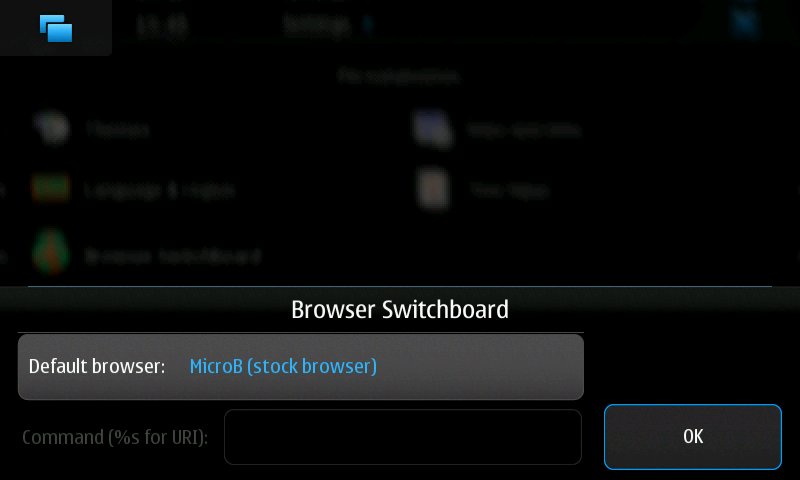
[Maemo 5 / N900 Apps] : Browser Switchboard 3.0 released

I'm pleased to announce version 3.0 of Browser Switchboard (formerly browser-proxy), a program which lets you use Tear, Fennec/Mobile Firefox, Midori, or other alternative browsers as the default browser on Maemo devices.


The biggest change from the previous stable release (2.2) is the addition of a control panel applet for configuring the default browser -- there's no longer a need to create or edit a config file from the shell. There are no user-visible changes from the 3.0rc1 release.

Full instructions for configuring and using Browser Switchboard, along with instructions for compiling and installing it manually, are available in the README file: https://git.maemo.org/projects/browser-switch/?p=browser-switch;a=blob_plain;f=README;hb=HEAD

Thursday, December 24, 2009

Maemo 5 / N900 : Revamped Transmission !

Do you remember transmission? Well, there's new upcoming version with remaked UI so it would be great for all use cases, now all info bout downloads is right on the main screen. Row dividers now also have the functionality of progress bars. Tap the row to see details.


And, what’s more important – it looks perfect in portrait mode :)


Stay tuned !

Via : tabletui

Tuesday, December 15, 2009

N900 : MultiTasking, A Baby's Game...

One of the main highlights of the Nokia N900 is the ability to seamlessly switch between multiple apps.

Multitasking is one of the core strengths of the Maemo Platform .

How about Browsing a couple of heavy websites (facebook + google wave + Youtube) while listening to music , have a chat conversation , check your email and reply to facebook messages, waves and youtube comments ? Its all possible with the N900 !

Check out the demo :


What do you think? Do you know other beasts that can do that seamlessly ?

Saturday, December 5, 2009

Windows Live Messenger For Samsung Omnia HD

Here's a modded working version for the Samsung Omnia HD by andidegn from forums.samsungi8910omnia ;)

Just install the Nokia Webserver.sis first and then the Win Live.sis, enjoy !

Download it ! 

Tuesday, November 17, 2009

Hahlo is an Awesome Twitter (Web) App on the Nokia N900

A nice twitter web app called Hahlo has been reviewed by Mark Guim !

There’s no need to download anything since it’s accessible through the web browser. I’m surprised at the features it offers like auto-refresh, inline photos, inline replies, tweets near me, OAuth login, and more.